Serving multiple Astro projects under one domain

On This Page
At Corsfix, we use Astro extensively across our entire platform. Our landing page is built with Astro, our documentation uses Starlight, and our CORS headers resource page is also Astro. In this post, we’ll share how we manage these multiple Astro projects while keeping them under the same domain, just on different subpaths.
The Problem: SEO and Separate Projects
Normally, having different projects means deploying them to different subdomains. However, this is problematic for SEO because search engines treat subdomains as separate websites. Having everything as subdirectories or subpaths is ideal since they can benefit from the main domain’s SEO authority.
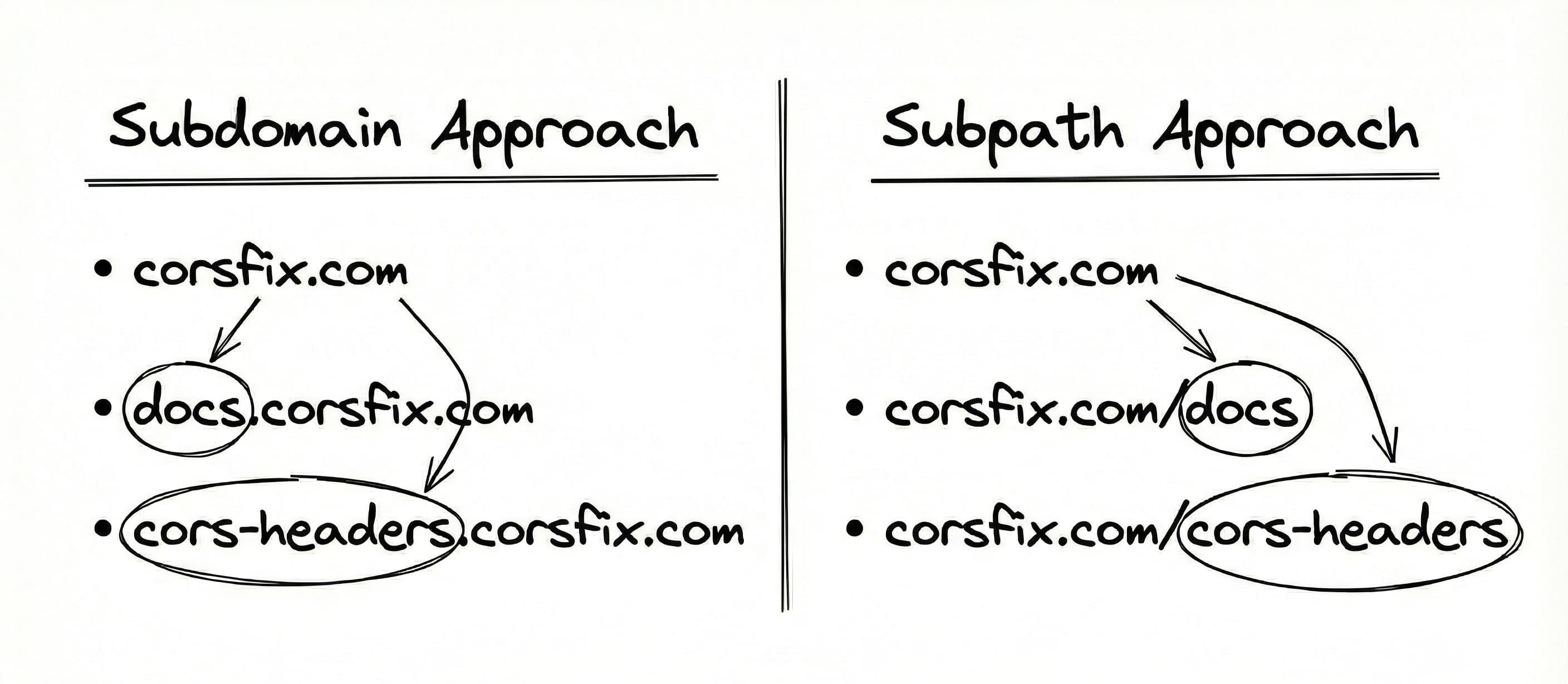 Subdomain vs Subpath structure
The straightforward solution would be to combine everything into a single Astro project with different subpaths. However, we wanted to open-source our docs and resources so people could view the code, contribute, and report issues, while keeping the landing page proprietary. With separate projects, this becomes a challenge: How do we serve different projects under one domain?
Why Not Use URL Rewrites?
A common solution would be to use URL rewrite features offered by hosting providers (sometimes called redirects or proxies, depending on the platform). We decided against this approach for several reasons:
- Cost: Many providers charge per request, which adds up quickly
- Vendor lock-in: We’d be tied to a specific platform’s features
- Overkill: Our use case is just static pages, we don’t need server-side processing
We needed a simpler, more portable solution.
Our Solution: Monorepo + Git Submodules + Custom Build
After researching, we settled on using pnpm workspace to manage multiple projects in a single monorepo. Here’s how we made it work:
1. Setting Up Child Repositories
First, we created separate repositories for our docs and CORS headers resource page. Both repositories are:
- Open-source and publicly accessible
- Standalone Astro projects (nothing fancy)
- Configured with base paths for their target subpaths
Each child project needs its astro.config.mjs configured with the appropriate base path:
// Example: docs project astro.config.mjsexport default defineConfig({ base: '/docs', // ... other config})...// Example: cors-headers project astro.config.mjsexport default defineConfig({ base: '/cors-headers', // ... other config})2. Adding Git Submodules
In our main repository (which hosts the landing page), we load the other repositories as git submodules. This allows us to include other repos as directories within our main repo.
# Add submodules to the main repogit submodule add <docs-repo-url> packages/docsgit submodule add <cors-headers-repo-url> packages/cors-headers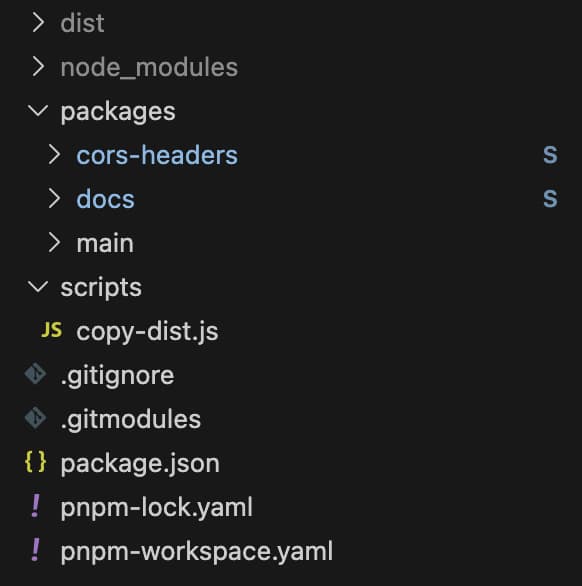 Folder structure with submodules
3. Configuring pnpm Workspace
We set up a pnpm workspace to manage all projects together. If you’re new to pnpm workspaces, check out the official pnpm workspace documentation for detailed setup instructions.
Create a pnpm-workspace.yaml file in the root of your repository:
packages: - 'packages/main' - 'packages/docs' - 'packages/cors-headers'This tells pnpm to treat each directory under packages/ as a separate project within the monorepo, allowing you to run commands across all projects or target specific ones using the --filter flag.
4. Custom Build Script
The final piece is orchestrating the builds and merging the output. We handle this with npm scripts and a custom Node.js script.
First, in our package.json, we define a build script that builds each project and then copies the results:
{ "scripts": { "build:main": "pnpm --filter main build", "build:cors-headers": "pnpm --filter cors-headers build", "build:docs": "pnpm --filter docs build", "copy-dist": "node scripts/copy-dist.js", "build": "pnpm build:main && pnpm build:cors-headers && pnpm build:docs && pnpm copy-dist" }}The copy-dist.js script handles merging all the built files:
const fs = require("fs");const path = require("path");
function copyDir(src, dest) {  // Recursively copy directory contents  if (!fs.existsSync(dest)) {    fs.mkdirSync(dest, { recursive: true });  }
  const entries = fs.readdirSync(src, { withFileTypes: true });
  for (let entry of entries) {    const srcPath = path.join(src, entry.name);    const destPath = path.join(dest, entry.name);
    if (entry.isDirectory()) {      copyDir(srcPath, destPath);    } else {      fs.copyFileSync(srcPath, destPath);    }  }}
function main() {  const rootDistPath = path.join(__dirname, "../dist");
  // Remove existing root dist  if (fs.existsSync(rootDistPath)) {    fs.rmSync(rootDistPath, { recursive: true, force: true });  }
  fs.mkdirSync(rootDistPath, { recursive: true });
  // Copy main package to root of dist  const mainDistPath = path.join(__dirname, "../packages/main/dist");  copyDir(mainDistPath, rootDistPath);
  // Copy other packages to subdirectories  for (const pkg of ["cors-headers", "docs"]) {    const pkgDistPath = path.join(__dirname, `../packages/${pkg}/dist`);    const targetPath = path.join(rootDistPath, pkg);    copyDir(pkgDistPath, targetPath);  }
  console.log("✅ All packages copied successfully!");}
main();
This script combines all the built outputs into a single dist folder that can be deployed as one static site.
The Result
With this setup, everything lives under a single domain deployment at corsfix.com, benefiting from shared SEO authority. Our docs and resources can be contributed to independently as open-source projects, while remaining compatible with any static hosting provider.
Our final structure looks like this:
corsfix.com/ → Landing page (proprietary)corsfix.com/docs → Documentation (open-source)corsfix.com/cors-headers → CORS headers resource (open-source)Conclusion
If you’re managing multiple Astro projects and want to keep them under one domain, the monorepo approach using pnpm workspace and git submodules is a solid solution. It’s simple, portable, and works with any static hosting provider.
If you’ve made it to the end, thanks for reading our first engineering blog post! Stay tuned for more technical deep dives from Corsfix.